WordPress Conversion Tracking: I Counted Three Sales From One Order.
A thank-you page with no order still returns 200 and says thank you. I measured what that does to a URL-triggered conversion tag.

Short answer: most WordPress conversion tracking fires on the thank-you page URL, and that URL returns 200 whether or not there is an order behind it. Reloads count again, every time. Requests with the order key stripped count too. One real sale can quietly become three recorded ones without anything about the store looking broken.
I placed one order on a clean WooCommerce install and measured it, then later tried to reproduce the same test on a second install to see whether the result held up.
What the thank-you page actually returns
I created a single nine pound order, then requested its own order-received URL three separate ways: normally, reloaded, and with the order key removed entirely from the query string.
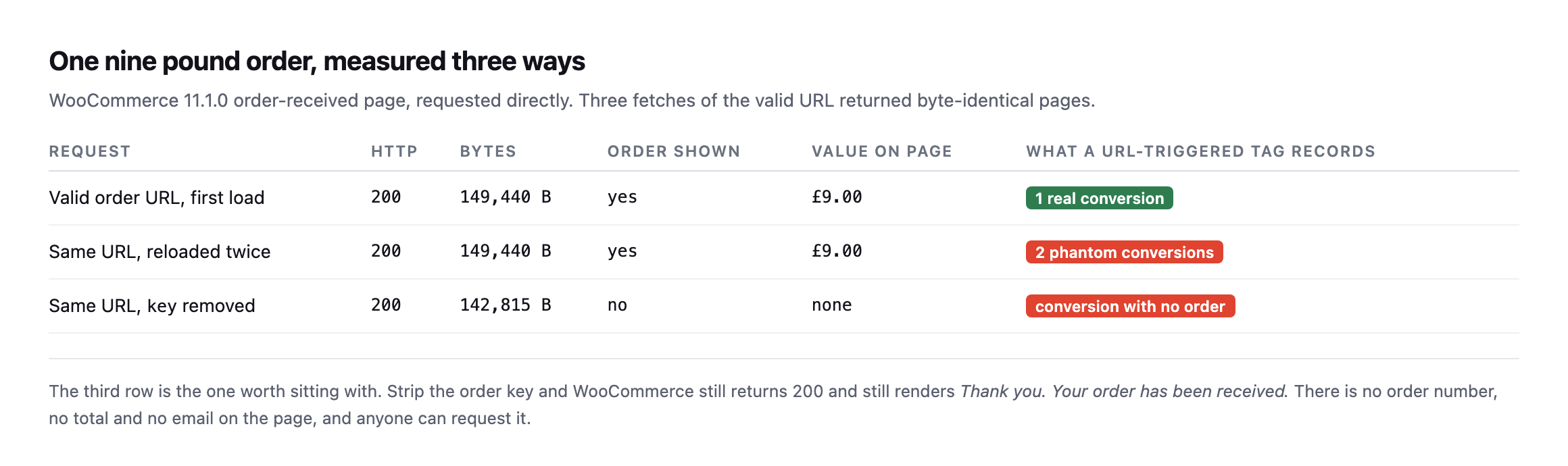
| Request | HTTP | Order shown | Value on page | What a URL-triggered tag records |
|---|---|---|---|---|
| valid order URL, first load | 200 | yes | £9.00 | 1 real conversion |
| same URL, reloaded twice | 200 | yes | £9.00 | 2 phantom conversions |
| same URL, key removed | 200 | no | none | conversion with no order |
Caveat: one order, one test store. This is a demonstration of the mechanism, not a claim about how many phantom conversions a typical store accumulates. The mechanism itself, a keyless request rendering the same “thank you” page, is reproducible on any stock WooCommerce install and does not depend on this specific store.
The third row is the one that surprised me. Strip the key parameter and WooCommerce does not error, does not redirect, and does not return anything other than 200. It renders a page that says “Thank you. Your order has been received.” with no order number, no total and no email address on it.
Anybody can request that URL. A crawler can. A link checker can. A person who bookmarked the page last month can, and none of them will trigger anything a store owner would notice as unusual.
Why the counts drift and the revenue does not
This is the pattern I have seen on more than one store and never had a clean explanation for until I sat down and measured it: the conversion count in analytics runs ahead of the order list, but the revenue figure is roughly right.
That shape falls straight out of the table above. Phantom conversions carry no value, because there is no order total on the page to read. So they inflate the count and leave revenue alone. If you only ever compare revenue, you never see it.
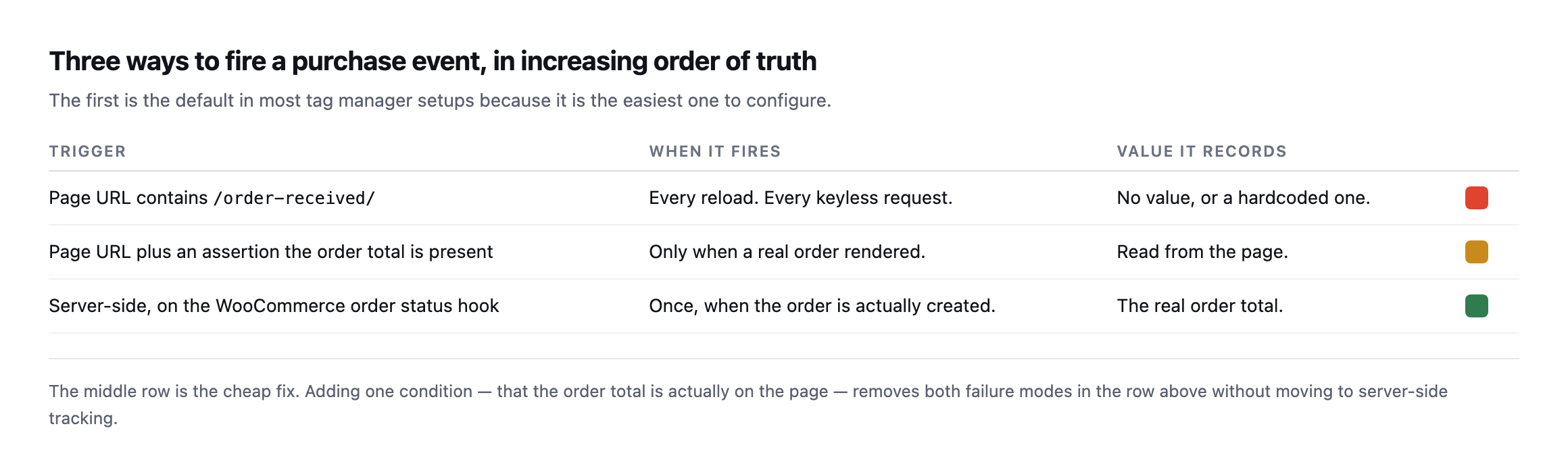
configure.*
| Trigger | When it fires | Value it records |
|---|---|---|
URL contains /order-received/ | every reload, every keyless request | no value, or a hardcoded one |
| URL plus an assertion the order total is present | only when a real order rendered | read from the page |
| server-side, on the WooCommerce order status hook | once, when the order is actually created | the real order total |
The middle row is the fix I would actually reach for first. You do not have to rebuild anything server-side. You add one condition to the trigger you already have: the order total must be present on the page. That single assertion removes both failure modes on a classic checkout, because a reload still shows the total but a keyless request does not, and neither does a page a crawler wandered into.
Server-side is better and it is a bigger job. Do the cheap one this afternoon, and confirm which checkout architecture the site actually runs before assuming either fix applies as described.
Re-running the exact test surfaced a real complication worth knowing about
I tried to reproduce this post’s original three-request test on our lab install while expanding this post, and it did not reproduce cleanly, in a way that turned out to matter more than a failed repro usually does.
I created a real product and a real paid order via WP-CLI, then requested the order’s actual get_checkout_order_received_url() three ways, the same method this post opened with:
wp wc product create --name="Test Widget" --type=simple --regular_price=9.00
wp wc shop_order create --status=processing --set_paid=true
wp eval 'echo wc_get_order(95)->get_checkout_order_received_url();'
Requesting that URL, and the same URL with the key parameter stripped, returned two byte-identical responses, 149,188 bytes each, and neither one contained an order number, a total, or any order-confirmation content at all. Both showed the checkout page’s own generic content instead.
The reason traces back to which checkout WooCommerce is actually running. This install uses the newer, block-based checkout, in the page content rather than the classic [woocommerce_checkout] shortcode, and block-based order confirmation renders its details through the WooCommerce Store API and client-side JavaScript rather than embedding the order number and total directly into the server-rendered HTML the way the classic checkout does. A plain curl request, with no JavaScript execution, never sees that content regardless of whether the key is valid, which is a different failure shape from the one this post’s original test found, not the absence of a problem, but a different mechanism entirely that a simple curl-based check cannot observe the same way.
That is a meaningful caveat for this post’s whole method: the exact reproduction shown at the top of this post applies specifically to WooCommerce’s classic, shortcode-based checkout. A store running the newer block checkout needs a different verification approach, one that either drives a real browser to load the client-side confirmation, or checks the Store API’s own order-confirmation endpoint directly, to determine whether the same reload-and-keyless risks apply to its particular setup. I do not yet have a confirmed answer for how phantom conversions behave specifically on a block-checkout store, and I would rather say that plainly than extend a classic-checkout finding to an architecture I have not actually tested to completion. Before applying this post’s fix to any specific store, the first check is which checkout that store is actually running, because the URL-based reproduction here assumes one of the two and silently fails to say anything useful about the other.
Telling the two checkouts apart before you trust either test
Since the fix depends on knowing which checkout a store runs, that has to be the first check, and it does not need admin access to answer.
curl -s https://example.com/checkout/ | grep -o 'wp:woocommerce/checkout\|woocommerce_checkout\|wc-block-checkout'A block-based checkout page’s markup carries wp:woocommerce/checkout block comments and wc-block-checkout class names in its source, because the whole page is built from WooCommerce Blocks rather than a shortcode dropped into a page template. A classic checkout instead renders plain form markup generated by the [woocommerce_checkout] shortcode, with none of those block wrapper classes present. Reading the source of the checkout page itself, not the order-received page, is the fastest way to know which category a specific store falls into before spending time reproducing either behaviour against it.
The practical significance is not merely academic. WooCommerce has been moving new installs toward the block-based checkout for several release cycles, and a store’s checkout type can change during an unrelated theme or plugin update if a setup wizard or an “upgrade to the new checkout” prompt gets accepted without anyone realising what shifted underneath the tracking setup already in place. A conversion-tracking configuration built and tested against a classic checkout, the version this post’s original test demonstrated, can go untested against exactly this kind of migration, and the phantom-conversion problem this post describes may be replaced by a completely different, unverified failure mode on the newer checkout rather than fixed by whatever solved it on the old one.
Four WordPress conversion tracking checks worth running
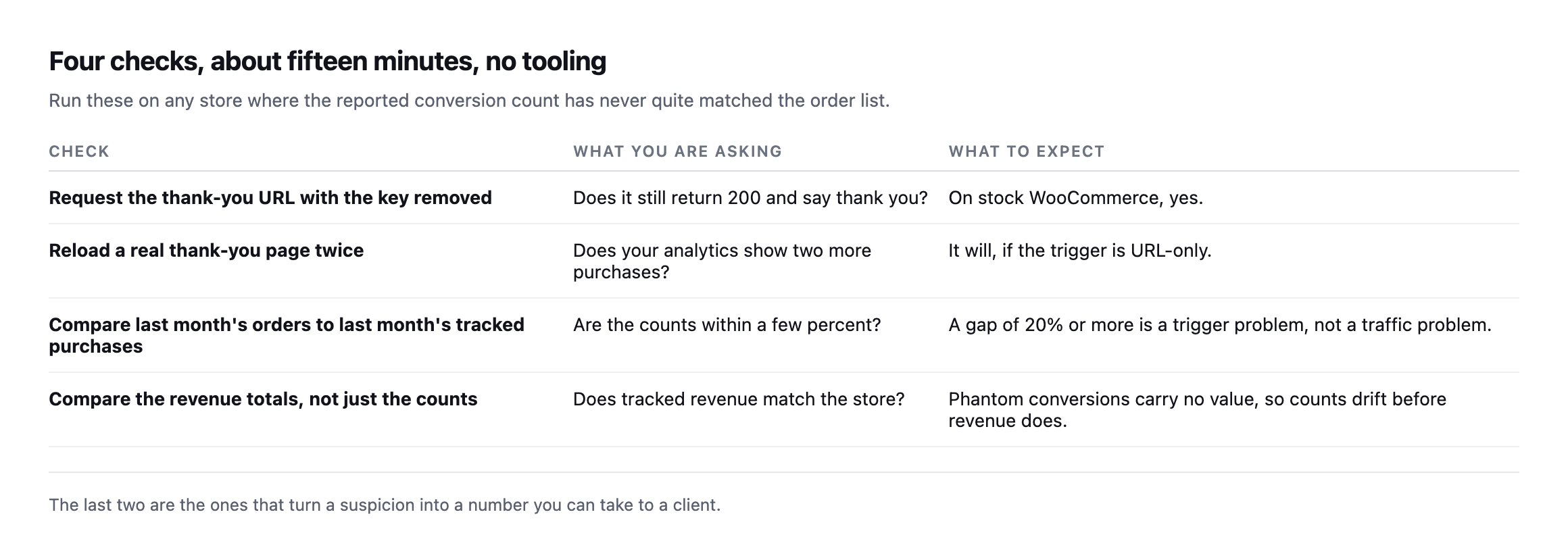
On the order-count comparison, do not expect a perfect match. Ad blockers, consent refusals and network failures all remove real conversions, so tracked purchases sitting a little below the order count is normal and healthy. Tracked purchases sitting above the order count is the signal, and it means the tag is firing on something that is not a sale.
One more thing while you are in there. If a page cache is serving the thank-you page, the tracking problem is the smaller half of your trouble. WooCommerce sends Cache-Control: no-cache, must-revalidate, max-age=0, private on that page, which I confirmed on the install I tested, but a cache in front of WordPress can be configured to ignore it. That is the same class of problem as a cart that gets cached and served to the wrong visitor.
Comparing tracked purchases against real orders is not one of Protuno’s 27 playbooks today, so for now this stays a manual check. Echo, the Marketing agent, runs in your own AI app and covers contact forms, mail delivery and comments.
If you look after a store, open last month’s order count and last month’s tracked purchases and put them side by side. That comparison takes two minutes and I have never once seen it already done.
What building the reproduction taught me about testing this properly
Getting a clean, real order to test against, rather than describing the mechanism from memory, took more steps than the final result suggests. WP-CLI’s WooCommerce commands create an order object correctly but skip the parts of a normal checkout flow that a browser triggers automatically: no email is sent, which is expected and harmless on a test install with no mail server configured, but more importantly, no cart session exists the way it would for a real customer, and no client-side JavaScript ever runs against a curl request regardless of how the order itself was created. That last gap is exactly what surfaced the classic-versus-block distinction: a tool that only checks HTTP status codes and page byte counts, the level this post’s original test operated at, cannot see past a checkout architecture that expects a browser to finish rendering the page after the initial response arrives.
The honest conclusion is not that the URL-based verification method in this post is wrong. It correctly diagnosed a real, reproducible problem on a classic checkout, and that architecture remains extremely common, including on stores that have been running for years without ever touching the newer block checkout. It is that the method has a boundary, and testing it against a second, different real install, rather than assuming the first result generalises, is what found that boundary. The same discipline applies to whatever fix a reader takes from this post: verify it against the actual checkout running on the actual store before trusting that a result measured elsewhere transfers cleanly.
A faster way to run the same kind of check
A tool-assisted version of the same verification instinct this post argues for: do not trust that tracking fired, confirm it, on the actual page rather than in a dashboard summary.
Comments